Chain Ladder in Python
Recently I was trying to implement a simple chain ladder model in Python. I had tried this a few years back when my skills were not as... skilled. Back then I knew there was a chain ladder library for R, but when I tried searching for a similar package in Python, I found nothing notable.
I hadn't approached the problem for a while until a few months back when out of interest I searched again. I found an excellent module developed by a GitHub user by the name of JBogaardt. It seems to be a passion project of his because he is consistently working on and developing it by himself.
https://chainladder-python.readthedocs.io/en/latest/index.html You can view the documentation here
What's great is that it aims to be compatible with the Pandas and Scikit-Learn APIs. This means that if you are used to using either of these modules you'll quickly grasp chainladder. Further, if you are a fan of sklearn pipelines, then you can easily incorporate chainladder into your pipelines, as I will show below.
There is some good documentation available in the docs, but I figured I'd write a bit of an introductory guide here too to demonstrate its power.
The Use Case -- Calculating IBNR for an Insurer
To demonstrate some of the abilities of chainladder we will be calculating the IBNR for an insurer across six lines of business, using a blend of the loss ratio and Cape Cod methods.
(As a note, this post assumes prior knowledge of short-term actuarial reserving. Also, I won't be worrying about the quality of the reserving; the methods are purely for demonstration.)
Loading the data
We will use a dataset made up of claims data from 376 US insurance groups. This dataset is commonly used in research and is built into chainladder. You may recognize it as Schedule P data from the Casualty Actuarial society.
The data is already triangulated for us and in the format required by chainladder. chainladder has a Triangle class that is the required format for its methods. I will explain how the Triangle class works after I load the data.
import chainladder as cl
import pandas as pd
data = cl.load_sample('clrd')
data| Triangle Summary | |
|---|---|
| Valuation: | 1997-12 |
| Grain: | OYDY |
| Shape: | (775, 6, 10, 10) |
| Index: | [GRNAME, LOB] |
| Columns: | [IncurLoss, CumPaidLoss, BulkLoss, EarnedPremDIR, EarnedPremCeded, EarnedPremNet] |
This is a summary of the triangle data. It gives us a high level snapshot of all the pertinent details.
Valuation tells us the valuation date of the data, in this case December 1997.
The Grain is the granularity of our triangle. This data is loaded by default on an Origin Year Development Year basis (OYDY), but it can be loaded with another grain. We can also easily change grains between monthly, quarterly and annually.
The Shape is the same as the shape we are familiar with from pandas. You will note the shape of the triangle is four dimensional. This might sound strange, since the triangles we are familiar with are two dimensional. But part of the power of the chainladder Triangle data type, is that it allows us to work with multiple triangle at once. The first two items of the shape tuple tell us the number of rows and columns our set has, and the last two tell us the number of origin periods and development periods we have.
If we were to visualise the triangle, it would look something like this:
| Column 1 | Column 2 | ... | Column 6 | |
|---|---|---|---|---|
| 1 | triangle(1, 1) | triangle(1, 2) | ... | triangle(1, 6) |
| 2 | triangle(2, 1) | triangle(2, 2) | ... | triangle(2, 6) |
| ... | ... | ... | ... | ... |
| 775 | triangle(775, 1) | triangle(775, 2) | ... | triangle(775, 6) |
So each cell of our dataframe is itself a 2-dimensional triangle with 10 origin periods and 10 development periods.
Now, let's look at Index and Columns to complete our understanding of the Triangle data type.
We have a multi-level index. The first level for this dataset is GRNAME which is the name of the insurance group. The second level is LOB; the line of business. For each insurance group, we have claims data for each line of business the group writes. Finally, we have the Columns. This is telling us for each GRNAME and LOB, we have a triangulation of each column. Let's revisit the visualisation, but this time allowing for Index and Columns:
| IncurLoss | CumPaidLoss | ... | EarnedPremNet | |
|---|---|---|---|---|
| (Adriatic Ins Co, othliab) | triangle(1, 1) | triangle(1, 2) | ... | triangle(1, 6) |
| (Adriatic Ins Co, ppauto) | triangle(2, 1) | triangle(2, 2) | ... | triangle(2, 6) |
| ... | ... | ... | ... | ... |
| (Zurich Ins (Guam) Inc, wkcomp) | triangle(775, 1) | triangle(775, 2) | ... | triangle(775, 6) |
Now, let's zoom into one of the triangles, say the cumulative paid losses (CumPaidLoss) for the Workmen's Compensation line of business (wkcomp) line of business for Allstate Ins Co Grp:
data.loc[('Allstate Ins Co Grp', 'wkcomp'), 'CumPaidLoss']| 12 | 24 | 36 | 48 | 60 | 72 | 84 | 96 | 108 | 120 | |
|---|---|---|---|---|---|---|---|---|---|---|
| 1988 | 70,571 | 155,905 | 220,744 | 251,595 | 274,156 | 287,676 | 298,499 | 304,873 | 321,808 | 325,322 |
| 1989 | 66,547 | 136,447 | 179,142 | 211,343 | 231,430 | 244,750 | 254,557 | 270,059 | 273,873 | NaN |
| 1990 | 52,233 | 133,370 | 178,444 | 204,442 | 222,193 | 232,940 | 253,337 | 256,788 | NaN | NaN |
| 1991 | 59,315 | 128,051 | 169,793 | 196,685 | 213,165 | 234,676 | 239,195 | NaN | NaN | NaN |
| 1992 | 39,991 | 89,873 | 114,117 | 133,003 | 154,362 | 159,496 | NaN | NaN | NaN | NaN |
| 1993 | 19,744 | 47,229 | 61,909 | 85,099 | 87,215 | NaN | NaN | NaN | NaN | NaN |
| 1994 | 20,379 | 46,773 | 88,636 | 91,077 | NaN | NaN | NaN | NaN | NaN | NaN |
| 1995 | 18,756 | 84,712 | 87,311 | NaN | NaN | NaN | NaN | NaN | NaN | NaN |
| 1996 | 42,609 | 44,916 | NaN | NaN | NaN | NaN | NaN | NaN | NaN | NaN |
| 1997 | 691 | NaN | NaN | NaN | NaN | NaN | NaN | NaN | NaN | NaN |
And there is the triangle we are familiar with! We have 775 * 6 = 4 650 of these in our data, all easily accessible using *pandas* style indexing.
Okay, so that is actually a lot of data, and it is a bit overwhelming. Let's just focus on one insurance group, National American Ins Co. And the only columns we really care about for now are CumPaidLoss and EarnedPremDIR.
naic = data.loc['National American Ins Co', ['CumPaidLoss', 'EarnedPremDIR']]
naic| Triangle Summary | |
|---|---|
| Valuation: | 1997-12 |
| Grain: | OYDY |
| Shape: | (6, 2, 10, 10) |
| Index: | [LOB] |
| Columns: | [CumPaidLoss, EarnedPremDIR] |
This is the data we will work with. It has only one index now, LOB, because we selected only one group. And only two columns, the cumulative paid loss and earned premium.
Useful methods of the Triangle class
Triangle's have a number of useful built in methods to make working with them easier. Let's focus on Cumulative Claims Paid for Workmens Compensation for these examples just to simplify some of the indexing.
wkcomp = naic.loc['wkcomp', 'CumPaidLoss']
wkcomp| 12 | 24 | 36 | 48 | 60 | 72 | 84 | 96 | 108 | 120 | |
|---|---|---|---|---|---|---|---|---|---|---|
| 1988 | 106 | 287 | 340 | 473 | 544 | 571 | 581 | 581 | 581 | 581 |
| 1989 | 672 | 1,839 | 1,547 | 1,650 | 1,810 | 1,838 | 1,872 | 1,872 | 1,897 | NaN |
| 1990 | 1,436 | 2,963 | 4,184 | 4,728 | 5,033 | 5,134 | 5,011 | 5,120 | NaN | NaN |
| 1991 | 1,810 | 3,852 | 5,056 | 5,703 | 6,148 | 6,313 | 6,526 | NaN | NaN | NaN |
| 1992 | 3,938 | 9,948 | 12,783 | 13,800 | 14,195 | 14,509 | NaN | NaN | NaN | NaN |
| 1993 | 4,961 | 11,196 | 14,062 | 15,193 | 15,696 | NaN | NaN | NaN | NaN | NaN |
| 1994 | 4,581 | 11,727 | 15,090 | 16,442 | NaN | NaN | NaN | NaN | NaN | NaN |
| 1995 | 4,364 | 11,029 | 13,526 | NaN | NaN | NaN | NaN | NaN | NaN | NaN |
| 1996 | 5,295 | 12,017 | NaN | NaN | NaN | NaN | NaN | NaN | NaN | NaN |
| 1997 | 6,478 | NaN | NaN | NaN | NaN | NaN | NaN | NaN | NaN | NaN |
The Triangle class gives us quick access to many useful methods. We can easily convert from cumulative to incremental, and back:
wkcomp.cum_to_incr()| 12 | 24 | 36 | 48 | 60 | 72 | 84 | 96 | 108 | 120 | |
|---|---|---|---|---|---|---|---|---|---|---|
| 1988 | 106 | 181 | 53 | 133 | 71 | 27 | 10 | NaN | NaN | NaN |
| 1989 | 672 | 1,167 | -292 | 103 | 160 | 28 | 34 | NaN | 25 | NaN |
| 1990 | 1,436 | 1,527 | 1,221 | 544 | 305 | 101 | -123 | 109 | NaN | NaN |
| 1991 | 1,810 | 2,042 | 1,204 | 647 | 445 | 165 | 213 | NaN | NaN | NaN |
| 1992 | 3,938 | 6,010 | 2,835 | 1,017 | 395 | 314 | NaN | NaN | NaN | NaN |
| 1993 | 4,961 | 6,235 | 2,866 | 1,131 | 503 | NaN | NaN | NaN | NaN | NaN |
| 1994 | 4,581 | 7,146 | 3,363 | 1,352 | NaN | NaN | NaN | NaN | NaN | NaN |
| 1995 | 4,364 | 6,665 | 2,497 | NaN | NaN | NaN | NaN | NaN | NaN | NaN |
| 1996 | 5,295 | 6,722 | NaN | NaN | NaN | NaN | NaN | NaN | NaN | NaN |
| 1997 | 6,478 | NaN | NaN | NaN | NaN | NaN | NaN | NaN | NaN | NaN |
We can quickly get development factors for each cell of the triangle
wkcomp.link_ratio| 12-24 | 24-36 | 36-48 | 48-60 | 60-72 | 72-84 | 84-96 | 96-108 | 108-120 | |
|---|---|---|---|---|---|---|---|---|---|
| 1988 | 2.7075 | 1.1847 | 1.3912 | 1.1501 | 1.0496 | 1.0175 | 1.0000 | 1.0000 | 1.0000 |
| 1989 | 2.7366 | 0.8412 | 1.0666 | 1.0970 | 1.0155 | 1.0185 | 1.0000 | 1.0134 | NaN |
| 1990 | 2.0634 | 1.4121 | 1.1300 | 1.0645 | 1.0201 | 0.9760 | 1.0218 | NaN | NaN |
| 1991 | 2.1282 | 1.3126 | 1.1280 | 1.0780 | 1.0268 | 1.0337 | NaN | NaN | NaN |
| 1992 | 2.5262 | 1.2850 | 1.0796 | 1.0286 | 1.0221 | NaN | NaN | NaN | NaN |
| 1993 | 2.2568 | 1.2560 | 1.0804 | 1.0331 | NaN | NaN | NaN | NaN | NaN |
| 1994 | 2.5599 | 1.2868 | 1.0896 | NaN | NaN | NaN | NaN | NaN | NaN |
| 1995 | 2.5273 | 1.2264 | NaN | NaN | NaN | NaN | NaN | NaN | NaN |
| 1996 | 2.2695 | NaN | NaN | NaN | NaN | NaN | NaN | NaN | NaN |
And because the API is similar to pandas, we can also plot very easily
wkcomp.T.plot()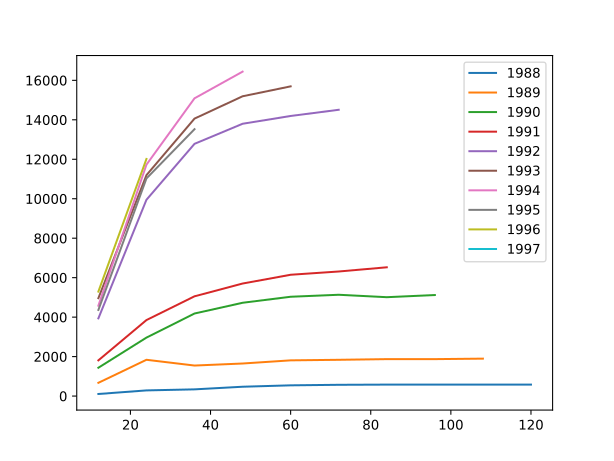
wkcomp.link_ratio.plot()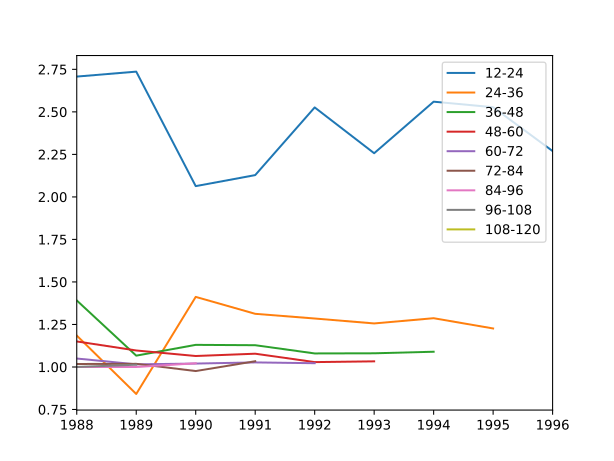
There are numerous other methods and I urge you to explore them in the documentation, or just while playing around with the data in a jupyter workbook.
Using basic chain ladder to calculate IBNR
Now, since we have our triangle, the next step is to apply good old chain ladder. In a standard actuarial workflow, this normally involves a bit of Excel work where we calculate development factors and multiply it out to get our ultimate claims figures. We then subtract the latest developments to get our IBNR portion. It is not terribly difficult if we have standardised workbooks, but there is always some issue that pops up. Not to mention, without really stringent workbook controls, Excel is a very uncontrolled environment prone to human error and operational error. I am sure we have all experienced the darker side of Excel (usually late at night before a deadline).
With chainladder things are a lot easier:
bcl = cl.Chainladder().fit(naic)And that's pretty much it.
Okay, I am oversimplifying things. But, technically, that one line applied a basic chain ladder to every line of business. We can get an IBNR for our insurance group with the following line:
bcl.ibnr_['CumPaidLoss'].sum()| 2261 | |
|---|---|
| 1988 | NaN |
| 1989 | 161 |
| 1990 | 392 |
| 1991 | 592 |
| 1992 | 761 |
| 1993 | 1,037 |
| 1994 | 1,861 |
| 1995 | 4,130 |
| 1996 | 10,857 |
| 1997 | 30,653 |
Let's focus on Workmens Compensation again. We can see the full triangle expectation, as well as back fit the chain ladder to get a full expected triangle:
Full triangle
bcl.full_triangle_.loc['wkcomp', 'CumPaidLoss']| 12 | 24 | 36 | 48 | 60 | 72 | 84 | 96 | 108 | 120 | 132 | 9999 | |
|---|---|---|---|---|---|---|---|---|---|---|---|---|
| 1988 | 106 | 287 | 340 | 473 | 544 | 571 | 581 | 581 | 581 | 581 | 581 | 581 |
| 1989 | 672 | 1,839 | 1,547 | 1,650 | 1,810 | 1,838 | 1,872 | 1,872 | 1,897 | 1,897 | 1,897 | 1,897 |
| 1990 | 1,436 | 2,963 | 4,184 | 4,728 | 5,033 | 5,134 | 5,011 | 5,120 | 5,172 | 5,172 | 5,172 | 5,172 |
| 1991 | 1,810 | 3,852 | 5,056 | 5,703 | 6,148 | 6,313 | 6,526 | 6,621 | 6,689 | 6,689 | 6,689 | 6,689 |
| 1992 | 3,938 | 9,948 | 12,783 | 13,800 | 14,195 | 14,509 | 14,649 | 14,863 | 15,015 | 15,015 | 15,015 | 15,015 |
| 1993 | 4,961 | 11,196 | 14,062 | 15,193 | 15,696 | 16,055 | 16,211 | 16,447 | 16,615 | 16,615 | 16,615 | 16,615 |
| 1994 | 4,581 | 11,727 | 15,090 | 16,442 | 17,186 | 17,579 | 17,749 | 18,008 | 18,192 | 18,192 | 18,192 | 18,192 |
| 1995 | 4,364 | 11,029 | 13,526 | 14,782 | 15,450 | 15,804 | 15,957 | 16,190 | 16,355 | 16,355 | 16,355 | 16,355 |
| 1996 | 5,295 | 12,017 | 15,143 | 16,549 | 17,298 | 17,694 | 17,865 | 18,126 | 18,311 | 18,311 | 18,311 | 18,311 |
| 1997 | 6,478 | 15,468 | 19,492 | 21,302 | 22,265 | 22,775 | 22,995 | 23,331 | 23,569 | 23,569 | 23,569 | 23,569 |
Backfit
bcl.full_expectation_.loc['wkcomp', 'CumPaidLoss']| 12 | 24 | 36 | 48 | 60 | 72 | 84 | 96 | 108 | 120 | 132 | 9999 | |
|---|---|---|---|---|---|---|---|---|---|---|---|---|
| 1988 | 160 | 381 | 480 | 525 | 549 | 561 | 567 | 575 | 581 | 581 | 581 | 581 |
| 1989 | 521 | 1,245 | 1,569 | 1,715 | 1,792 | 1,833 | 1,851 | 1,878 | 1,897 | 1,897 | 1,897 | 1,897 |
| 1990 | 1,422 | 3,394 | 4,277 | 4,675 | 4,886 | 4,998 | 5,046 | 5,120 | 5,172 | 5,172 | 5,172 | 5,172 |
| 1991 | 1,838 | 4,390 | 5,532 | 6,045 | 6,319 | 6,463 | 6,526 | 6,621 | 6,689 | 6,689 | 6,689 | 6,689 |
| 1992 | 4,127 | 9,854 | 12,417 | 13,570 | 14,184 | 14,509 | 14,649 | 14,863 | 15,015 | 15,015 | 15,015 | 15,015 |
| 1993 | 4,567 | 10,904 | 13,741 | 15,017 | 15,696 | 16,055 | 16,211 | 16,447 | 16,615 | 16,615 | 16,615 | 16,615 |
| 1994 | 5,000 | 11,939 | 15,045 | 16,442 | 17,186 | 17,579 | 17,749 | 18,008 | 18,192 | 18,192 | 18,192 | 18,192 |
| 1995 | 4,495 | 10,734 | 13,526 | 14,782 | 15,450 | 15,804 | 15,957 | 16,190 | 16,355 | 16,355 | 16,355 | 16,355 |
| 1996 | 5,033 | 12,017 | 15,143 | 16,549 | 17,298 | 17,694 | 17,865 | 18,126 | 18,311 | 18,311 | 18,311 | 18,311 |
| 1997 | 6,478 | 15,468 | 19,492 | 21,302 | 22,265 | 22,775 | 22,995 | 23,331 | 23,569 | 23,569 | 23,569 | 23,569 |
We can also see development factors:
Cumulative development factors
bcl.cdf_.loc['wkcomp', 'CumPaidLoss']| 12-Ult | 24-Ult | 36-Ult | 48-Ult | 60-Ult | 72-Ult | 84-Ult | 96-Ult | 108-Ult | 120-Ult | 132-Ult | |
|---|---|---|---|---|---|---|---|---|---|---|---|
| (All) | 3.6383 | 1.5237 | 1.2092 | 1.1064 | 1.0586 | 1.0349 | 1.0249 | 1.0102 | 1.0000 | 1.0000 | 1.0000 |
Incremental development factors
bcl.ldf_.loc['wkcomp', 'CumPaidLoss']| 12-24 | 24-36 | 36-48 | 48-60 | 60-72 | 72-84 | 84-96 | 96-108 | 108-120 | 120-132 | 132-144 | |
|---|---|---|---|---|---|---|---|---|---|---|---|
| (All) | 2.3877 | 1.2602 | 1.0929 | 1.0452 | 1.0229 | 1.0097 | 1.0146 | 1.0102 | 1.0000 | 1.0000 | 1.0000 |
As you can see, chainladder adopts the sklearn API. If you can use sklearn, you can use chainladder.
Creating a simple reserving algorithm
Now, simply fitting a basic chain ladder is not always appropriate. We need to consider the sparsity of the triangle. Where there is too little data to use chain ladder based methods we will use the loss ratio approach. For other cases we will use the Cape Cod approach.
So how do we go about this? Well first, we need an indicator to tell us if the triangle is too sparse to apply chain ladder based methods.
If we convert non zero cells in the triangle to 1, we can compare the sum to the number of elements. If the sum is above a certain threshold we can say that it is too sparse and apply out simple loss ratio based approach.
Indicator for non zero elements
# n_cells is hardcoded for example purposes but should be derived in
# real world workflow
def get_sparsity(triangle, n_cells=55):
indicator = triangle.unstack() / triangle.unstack()
density = indicator.sum() / n_cells
return 1 - density
get_sparsity(naic.loc['prodliab', 'CumPaidLoss'])0.8363636363636364
So what threshold should be chosen? That's quite subjective. So let's just pick 25%, and go with that. Now, if a triangle has more than 25% sparsity, it means that 25% of the cells have no data. In a cumulative triangle, that is a lot (in my subjective opinion).
Now if a triangle is sparse, we want to apply the loss ratio. chainladder does not have a loss ratio method built in (and why would it?). It is not too difficult to create one, but for brevity we will just make a function that returns the IBNR based on a given loss ratio applied for a given number of years.
def loss_ratio_ibnr(triangle, earned_premium, loss_ratio, from_year):
earned_premium = earned_premium.to_frame()
earned_premium.columns = ['IBNR']
earned_premium['IBNR'] = loss_ratio * earned_premium
latest_paid = triangle.latest_diagonal.to_frame()
latest_paid.columns = ['IBNR']
ibnr = earned_premium[['IBNR']] - latest_paid
ibnr.loc[ibnr.index.year < from_year, 'IBNR'] = 0
return ibnr
loss_ratio_ibnr(
naic.loc['prodliab', 'CumPaidLoss'],
naic.loc['prodliab', 'EarnedPremDIR'].latest_diagonal,
0.5,
1995
)| IBNR | |
|---|---|
| 1988 | 0.0 |
| 1989 | 0.0 |
| 1990 | 0.0 |
| 1991 | 0.0 |
| 1992 | 0.0 |
| 1993 | 0.0 |
| 1994 | 0.0 |
| 1995 | 281.0 |
| 1996 | 416.5 |
| 1997 | 770.0 |
Great, so we have a way to get an IBNR for sparse triangles. Now we can create a simple reserving algorithm that uses loss ratio when the sparsity is above 25%, and Cape Cod otherwise.
def reserving_algorithm(triangle, sparsity_threshold):
lobs = triangle['LOB'].to_numpy()
ibnr_by_lob = {}
for lob in lobs:
claims = triangle.loc[lob, 'CumPaidLoss']
premium = triangle.loc[lob, 'EarnedPremDIR'].latest_diagonal
if get_sparsity(claims) >= 0.25:
ibnr_by_lob[lob] = loss_ratio_ibnr(claims, premium, 1.0, 1995)
ibnr_by_lob[lob].columns = ['Cape Cod']
else:
ibnr_by_lob[lob] = cl.CapeCod(decay=0.75).fit(
claims,
sample_weight=premium
).ibnr_.to_frame()
ibnr_by_lob[lob].columns = ['Cape Cod']
ibnr = pd.concat(ibnr_by_lob, axis=1)
ibnr['Total'] = ibnr.sum(axis=1)
return ibnr.fillna(0)reserving_algorithm(naic, 0.25)| comauto | medmal | othliab | ppauto | prodliab | wkcomp | Total | |
|---|---|---|---|---|---|---|---|
| Cape Cod | Cape Cod | Cape Cod | Cape Cod | Cape Cod | Cape Cod | ||
| 1988 | 0.000000 | 0.0 | 0.000000 | 0.000000 | 0.0 | 0.000000 | 0.000000 |
| 1989 | 199.700077 | 0.0 | 2.433665 | 0.000000 | 0.0 | 0.000000 | 202.133742 |
| 1990 | 374.176681 | 0.0 | 5.381205 | 0.000000 | 0.0 | 113.670274 | 493.228161 |
| 1991 | 384.622895 | 0.0 | 27.550540 | 0.000000 | 0.0 | 404.705647 | 816.879082 |
| 1992 | 294.215562 | 0.0 | -41.698234 | 0.189356 | 0.0 | 431.483501 | 684.190186 |
| 1993 | 255.948328 | 0.0 | -154.280465 | -0.430910 | 0.0 | 537.545822 | 638.782775 |
| 1994 | 420.565099 | 0.0 | -65.160634 | -253.447370 | 0.0 | 1280.055827 | 1382.012922 |
| 1995 | 393.962604 | 0.0 | 474.803152 | -338.502120 | 577.0 | 2242.557573 | 3349.821209 |
| 1996 | 979.192035 | 0.0 | 1570.368156 | 1029.200060 | 879.0 | 5393.652281 | 9851.412531 |
| 1997 | 2907.991561 | 0.0 | 3529.706847 | 4076.591330 | 1584.0 | 11639.363016 | 23737.652754 |
And there we have it, an (admittedly oversimplified) automated and repeatable reserving algorithm. (Medmal is zero because the triangle is 100% sparse and there is no earned premium).
I am focusing purely on the chainladder package and its usage, so let's ignore any discussion around whether the reserving approach is correct or not. For the purpose of demonstration it doesn't matter.
Where do we go from here?
In the real world life isn't so simple. What I have shown is only a small part of the reserving process, but I have demonstrated the usefulness of the chainladder package, and how free open-source software can be extremely valuable in a commercial context. Its not hard to imagine how this process can be extended in either direction and completely automate the reserving process of an insurer.
For example, we started this process using clean, triangulated data. But in reality, you get messy, tabular data from a system. So you would need to pull the data from the system, push it through a cleaning process and then a preprocessing process, before it would go into a more robust and complete version of the chainladder reserving process we've built above. But, with the right skills this is achievable. It simply takes investment of person-hours, which will save considerable person-hours in future.
After the chainladder process above, the results can be pushed to dashboarding systems, databases, or even directly into other actuarial models, such as a pricing model or a capital model.
Closing remarks
I hope some will find this post useful and begin experimenting with the chainladder library. Please reach out if you would like to discuss, point out errors or silly mistakes, or if you'd like to share your interesting findings.